Have you ever wished you could speed up or slow down videos while browsing the web? Look no further than the Super Video Speed Controller Chrome extension. With a total rating of 4.6, this powerful tool has garnered rave reviews from users around the globe.
Increased Flexibility and Control
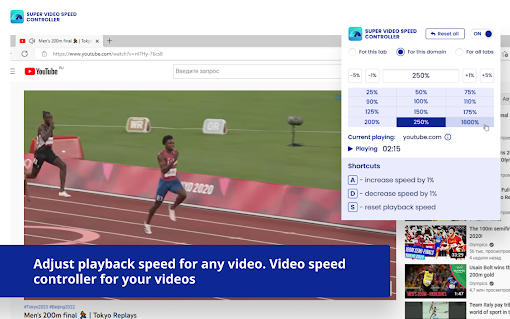
Super Video Speed Controller offers a wide range of features to enhance your video watching experience. One of its key features is the ability to adjust playback speed on any website. Whether you want to watch videos in double speed to save time or slow them down for better comprehension, this extension has you covered.
With presets and custom speed settings, you have the freedom to choose the playback speed that suits your needs. The presets make it easy to switch between popular speeds like 1x, 1.5x, and 2x with just a few clicks. Alternatively, you can set a custom speed in percentages, allowing for even more precise control.
Effortless Navigation and Accessibility
Super Video Speed Controller ensures seamless usability with its intuitive interface and convenient shortcuts. By simply clicking on the menu icon, which can be found under the "puzzle" icon in the toolbar, you can access the extension and adjust the playback speed with ease.
Additionally, this extension supports custom keyboard shortcuts, giving you the ability to control the speed of videos without ever needing to reach for your mouse. It's all about making your video watching experience as smooth and effortless as possible.
A User-Focused Extension
Don't just take our word for it - let the user reviews speak for themselves. Users have praised Super Video Speed Controller for its effectiveness and ease of use. Some have suggested additional features, such as customizable speed change steps and the ability to save preferred speeds with dedicated shortcuts.
One user commented that this extension works perfectly, making the whole world spin around them. Another user expressed their appreciation for its compatibility with online learning platforms, making it an invaluable tool for virtual classes.
While a few users have mentioned occasional audio choppiness on certain websites, the overall consensus is that Super Video Speed Controller is a reliable and powerful extension that significantly enhances the video watching experience.
Upgrade Your Video Watching Experience Today
With Super Video Speed Controller, you have the power to customize your video playback like never before. Say goodbye to boring, standard speeds and hello to a whole new world of flexibility and control.
So why wait? Install Super Video Speed Controller today and unlock a world of possibilities for your video watching pleasure.












30 Reviews For This Extension
Works perfect
It's just the best extension in this field. It works on every website. Thanks for making this extension.
There should be an option to turn the shortcut keys on and off. It locks the A, S, and D keys in games, but otherwise it’s pretty good. I’m giving it 3 stars for now, but I might update my rating after the next update.
Dev tried to attach their Amazon affiliate code to my purchases through the URL. REMOVE ASAP!! Very shady dev.
As of lately the YT video dont always get speed change but when I refresh desktop chrome page it latches on and works.. Any fixes Io can try?
Works flawlessly for me so far, I wanted to speed up a video but I couldn't do it without this extension
I am currently facing a bug that on certain websites(such as leetcode,nytimes) I am not able to use a,s,d keys because I believe they are linked to your extension for shortcuts ,please propose a solution thank you.
it suprises me that it works! and has more speed rather than the youtube one and you can change the speed in youtube shorts aswell! pretty good extension!
My absolute must have extension for speeding through slow arse Youtube videos. It has literally NEVER failed me on ANY website. Keep this thing alive PLEASE.
Just works.
Finally! I needed an extension to help me get through the countless training slides and presentations on various sites. I normally watch YT videos at 2x speed anyway so this extension let me achieve this. I tried about 10 others before finding this one.
Best extension i have saw in my career
Works well, but why can I not change the shortcut keys? A S D keys do not work unless I disable the extension...
ive been using this for about two years however i have a big complaint that whenever i want to type an a d or s i have to turn off the extension because that is shortcuts and theres no way i saw to change it
Perfect, does what it should
really helps
finally! the speed controller that actually works! thank you.
The experience with this product has so far been good .It is nothing special but do exactly what it promises to do .
Clear and useful extension
Best!
works perfect
works well ! like that theres a interface controller so i can always go back and add speed or decrease anytime and know the speed. hope it works on netflix too (not tried yet) i cant stand the 1.5x hope i can stack it up haha. Only tried on youtube and seems good !! thank you so much, keep up the nice work ! update: down 1 star, after sometime maybe 30min or 1hr keep going back to speed 1x, keep resetting i have to adjust back to lie back down... anyway to set fix at least it reset back to a faster speed update: 12/2/25 - wish can adjust the remote to remove 25-50-75 so i can set them to 275, 300, 315 xD or can adjust A button to +5 instead of 1 for easy adjusting on FULLScREEN XD but so far this is the best speeder i used !! other than current tab settings after awhile keep going back 100. other than this the rest best so far ! n even works on netflix, wonder if for disney and others too haha but i have no disney so cant try
The best one I've ever used.
W speed controller. The others don't work as well but this one works perfectly.
10 out of 10 experience
I found another working one try this : ClearView for YouTube - Speed Control & Focus Mode.
used to use Netflix Speeder and YouTube Speed Controls ( https://chromewebstore.google.com/detail/youtube-speed-controls/naalfmaaomhjpbndelnlijacdniggpjn ). But Netflix Speeder changed its UI recently, and i changed to this add-on. This one works fine.
tried a couple of speed controllers. This one is the only which works with linked learn videos. the only downside ist the bad customisability...I'd like to put some more breakpoints or my own in- / decrease steps. Would be nice if the dev would add a settings page for this. Beside all of that, this extension works good ?
Cannot customize shortcuts. Check out Video Speed Controller with Shortcuts.
Just Amazing